

- Credits
- 1,148
This is how your messages will look. Mr Beast for an example!

Quick Steps
 Make sure you're registered and logged in to the My Tube Talk forums
 Tap/Click on your username in the header and select account details or click here
 Scroll down and fill in your YouTube channel handle in the box that says...."YouTube Channel"! You can add it with the @ or without, it doesn't matter. Note: This is not the full link to your channel, it's the handle https://www.youtube.com/@THISPART
 You're done, your channel thumbnail, subscriber count and subscribe button will automatically be shown below each message you post on the forum
 Still stuck? Send me a message and I'll be glad to assist.
Screen Shots - DESKTOP
Step
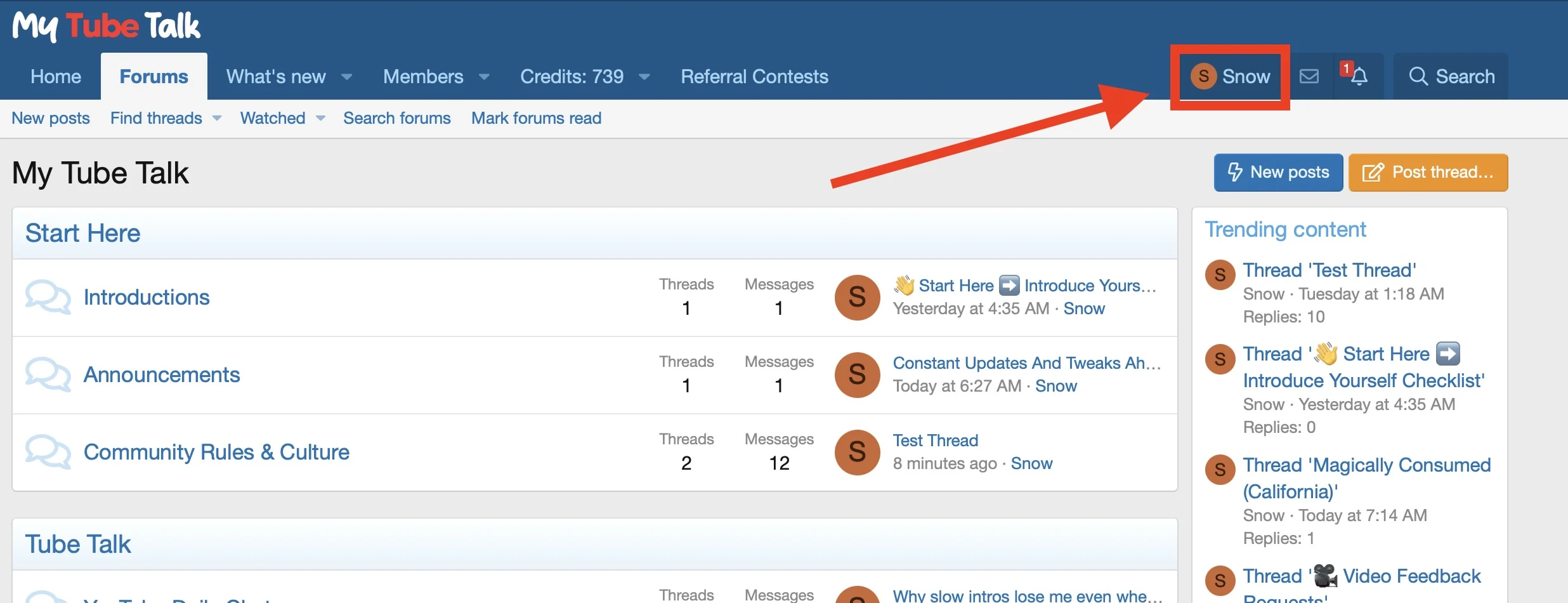
Step

Step

 Screenshots - MOBILE
Quick Steps
Make sure you're registered and logged in to the My Tube Talk forums Tap/Click on your username in the header and select account details or click here Scroll down and fill in your YouTube channel handle in the box that says...."YouTube Channel"! You can add it with the @ or without, it doesn't matter. Note: This is not the full link to your channel, it's the handle https://www.youtube.com/@THISPART You're done, your channel thumbnail, subscriber count and subscribe button will automatically be shown below each message you post on the forumStill stuck? Send me a message and I'll be glad to assist.Screen Shots - DESKTOP
Step
Step
Step
Screenshots - MOBILEStep

Step

Step

Step
Step